Infrastructure
Overview
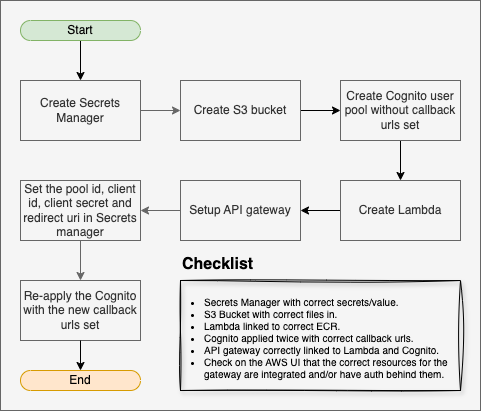
This API is deployed on AWS using Terraform modules in the terraform/ directory.
Before applying Terraform:
- Build and push the Lambda container image to ECR.
- Ensure an ECR repository already exists.
For container build and push steps, see the deployment guide.
Terraform Modules
The Terraform configuration is split into five modules:
terraform/secrets/(Secrets Manager)terraform/storage/(S3)terraform/authentication/(Cognito)terraform/lambda/(Lambda)terraform/api_gateway/(API Gateway)
Each module has environment-specific files under env/<environment>/.
For each module, set domain and service_subdomain in the tfvars file for your target environment.
Deployment Order
1. ECR Repository (prerequisite)
Create the ECR repository first. It is referenced by the storage and lambda modules.
2. Secrets Manager (terraform/secrets/)
Apply this module first.
For the first apply, leave these Cognito values blank in tfvars:
cognito_pool_idcognito_client_idcognito_client_secretredirect_uri
3. Storage (terraform/storage/)
Set ecr_repository_name in tfvars, then apply.
4. Authentication (terraform/authentication/)
Apply the Cognito module and capture outputs required by the secrets module.
5. Lambda (terraform/lambda/)
Set the following lambda-specific variables before apply:
ecr_repository(ECR repository containing the Lambda image)container_ver(image tag to deploy)azure_secret_name(Secrets Manager secret name for Teams alert credentials)branch_name(alert gate: onlymainsends alerts)aws_account_name(environment label shown in alert messages derived from domain)
The secret referenced by azure_secret_name must contain JSON in this shape:
json
{
  "azure_tenant_id": "tenant-id",
  "azure_client_id": "client-id",
  "azure_client_secret": "client-secret",
  "azure_scope": "https://graph.microsoft.com/.default",
  "azure_webhook_url": "https://example.webhook.office.com/..."
}
6. API Gateway (terraform/api_gateway/)
Apply the API Gateway module and note output URLs.
7. Re-apply Secrets Manager (terraform/secrets/)
Update and re-apply secrets with Cognito values populated:
cognito_pool_idcognito_client_idcognito_client_secretredirect_uri
8. Complete
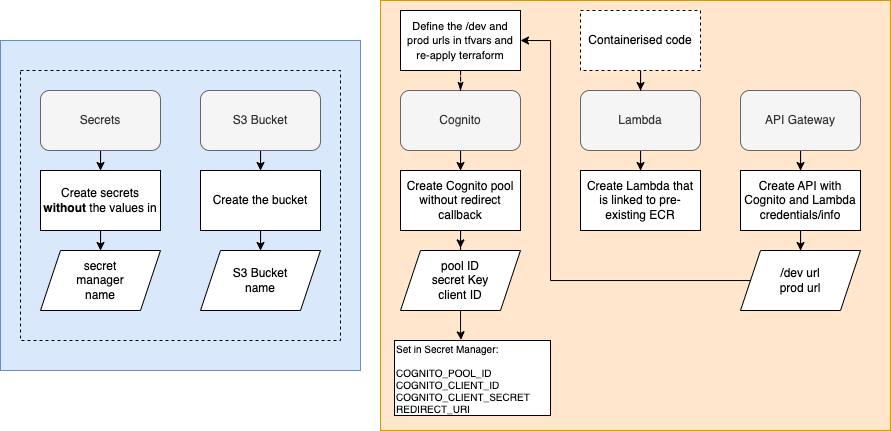
Terraform Configuration Diagram